Best free receipt scanner app in Canada: what free actually includes
Short answer: almost every receipt app is free to download; very few are free to actually use. The meter usually starts at the scan, the export, or the backup. Here is where "free" ends in each kind of tool, and what to check before you trust the word on a store listing.
The four kinds of receipt scanner apps in Canada
Most "best receipt scanner" lists mix four different kinds of tools that happen to share a camera button. Naming the category tells you more than naming an app, because the pricing model and the job come with the category:
| Kind of app | Built for | What free usually includes | Where free usually ends |
|---|---|---|---|
| Dedicated receipt keepers | Capturing receipts and keeping them tax-ready | Scanning and a basic list; the good ones include export | Scan caps or an export paywall in the metered ones |
| Accounting-suite scanners | Feeding receipts into bookkeeping software | A trial, or capture tied to a paid subscription | The suite subscription; the scanner is a feature, not the product |
| Cashback and rewards apps | Paying you points for grocery receipts | Genuinely free; you are the product | They keep the marketing data, not your records: no exports, no retention |
| General document scanners | Turning any paper into a PDF | A few scans, then a subscription in most | No receipt fields at all: no vendor, total, date, or running list |
This page is about picking a scanner for the record-keeping job. If your real question is the tax workflow around it, the buyer's guide for Canadian taxes goes tool by tool.
Where "free" usually ends
- At the scan. Some apps sell OCR itself, as per-scan packs or a monthly scanning subscription, so every receipt costs money to read. Check the in-app purchase list on the App Store page; it is public.
- At the export. Others let you scan freely but paywall the CSV or PDF export, which is the moment the receipts are actually useful at tax time.
- At the backup. A quieter one: storage or backup sits behind the subscription, so the free tier quietly stops protecting the records you are legally keeping.
- At the ads. Ad-supported free tiers exist; reviews tell you quickly whether the ads gate core actions.
What to check before you trust "free"
- Open the listing's In-App Purchases section: scan packs or "OCR" line items mean scanning is metered.
- Search the reviews for "export" and "backup": paywall complaints cluster there.
- Confirm the app's retention story: your records need to survive six years from the end of the tax year, so a free tier that expires data is not free, it is a trial.
- Watch the words "free trial" on the listing. A trial is a countdown, not a price. If the store page shows a trial and a subscription, the app is a paid app with a delay.
- Check what leaves with you: if you quit the app, can you take every image and a spreadsheet? An export that only works while you subscribe is a lease on your own records.
The checklist: what a scanner app must do for Canadian records
- Keep the original photo. The CRA accepts a properly captured image as the record, and a clear photo can legally replace the paper; an app that stores only extracted numbers is not keeping your evidence.
- Read vendor, total, and date for you. That is the difference between a scanner and a camera roll. Bonus points when the GST or HST line stays visible on the stored image, because input tax credits need the details, not just proof of payment.
- Work offline, on the phone. On-device text recognition means the checkout line, the parking lot, and airplane mode all work, and the receipt photo does not have to travel anywhere to be read.
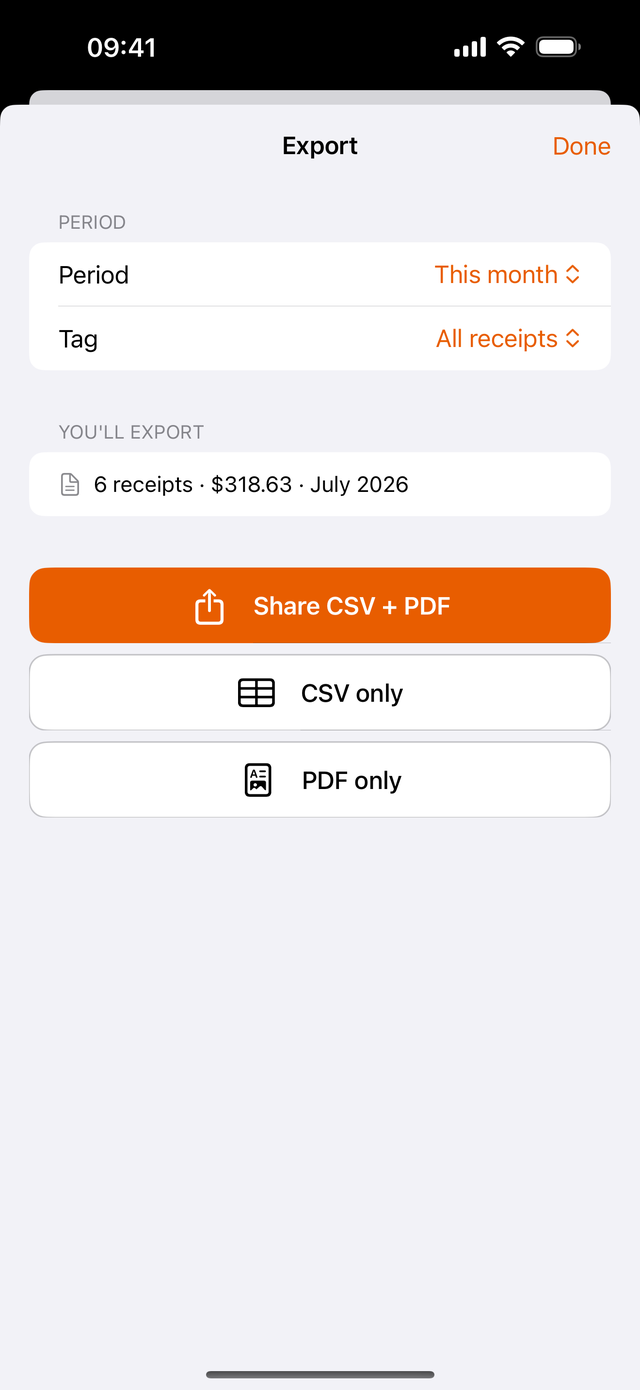
- Export to files you own. CSV for the accountant, PDF for the review letter, any date range, no paywall between you and your own records.
- Survive six years. Thermal paper will not last the retention window (here is why), so the app's copy is the copy that matters. A backlog matters too: look for batch import so the shoebox can catch up.
- Accept digital receipts. Half of what you need to keep never touches paper. An email-in address that files forwarded bills and PDF receipts closes that half.
Three situations, three ways to choose
Self-employed, filing a T2125. You need every business receipt plus the household bills behind a home-office claim (utility bills included). Prioritize unmetered scanning and tags or categories, because volume is the whole game and per-scan pricing punishes exactly you.
Small business with a bookkeeper. The receipts must leave the phone cleanly: shared access or a simple export handoff beats any single-device feature. If you already pay for accounting software, its scanner may be included; check whether capture without the subscription survives if you ever change suites.
Personal records. Warranties, returns, and the medical receipts that feed a future 12-month credit window. Free matters most here because the payoff is occasional; an app with a monthly fee for keeping twenty receipts a year is upside down.
Where Bagging sits
Bagging: Receipts & Expenses is free on the App Store with the whole core job included: scanning runs on your device (no meter, no per-scan charge), there are no ads, the original photo is kept, and any date range exports as CSV or PDF. The deliberate limits are the same as always: no bank sync, no line items, no currency conversion, iPhone only. If you need those, a paid accounting suite is honestly the better fit; our full buyer's guide maps the categories fairly.
The takeaway
- Decide the category first: keeper, accounting-suite, cashback, or document scanner. The category sets the price model before any app does.
- Read where free ends: the scan, the export, the backup, or the ads. The In-App Purchases list tells the truth.
- Hold the Canadian bar: original image kept, CRA-acceptable capture, exports you own, records that outlive six years.
Common questions
What is the best free receipt scanner app in Canada?
It depends where you need free to extend. If the job is scanning receipts and keeping them tax-ready, Bagging: Receipts & Expenses is free with on-device scanning, no ads, and CSV plus PDF export included. If you need full accounting or bank feeds, those live in paid tools, and no free tier changes that.
Are receipt scanner apps really free?
Usually only the download is. Common patterns: OCR sold per scan or per month, exports behind a subscription, backups paywalled, or an ad-supported tier that gates core actions. The App Store listing's In-App Purchases section shows the real model before you install.
Does Bagging charge for scanning or exporting?
No. Text recognition runs on your device at no charge with no scan meter, and CSV and PDF export for any date range is included. There are no ads and receipts are never sold.
What is the catch with Bagging being free?
The honest trade is scope, not money: no bank sync, no line-item capture, no currency conversion, and it is iPhone-only. It is a receipt keeper on purpose, not accounting software.
What is the best receipt scanner app in Canada?
The one whose category matches your job. For keeping tax records: a dedicated receipt keeper with unmetered scanning and free export. For bookkeeping pipelines: the scanner inside the accounting suite you already pay for. For points on groceries: a cashback app, kept separate from your records. This page's checklist is the test that sorts them.
Is there a truly free receipt scanning app in Canada?
Yes, but verify the shape of free before trusting it: no scan meter, no export paywall, no expiring storage, no ads gating core actions. Bagging is built as exactly that and says so publicly; whatever you choose, the store listing's In-App Purchases section is where the claim gets checked.
Do receipt scanner apps work offline?
Only the ones that read text on the device itself. Apps that send photos to a server for recognition need a connection and add a privacy hop. On-device recognition scans in airplane mode and keeps the image on your phone until you choose to sync.
What happens to my receipts if I stop using a scanner app?
With a good one, nothing bad: you export every image and a full spreadsheet first, and the records live on in your files. That is why export-behind-a-paywall is the most important fine print on the listing, and why it is worth testing the export before the shoebox goes in. Our guide to switching receipt apps covers the move itself.
Free where it counts
Bagging is a free iPhone app: on-device scanning with no meter, no ads, the photo kept audit-ready, and CSV plus PDF export included.
This guide is general information, not purchasing advice. App pricing models change often; verify any tool, including ours, at the source. Checked September 2026.