How to categorize receipts for Canadian taxes (without accounting software)
You do not need accounting software to categorize receipts. You need a short, consistent set of labels that match the CRA's T2125 expense lines, applied at the moment you capture each receipt. About ten labels cover almost every sole proprietor; the table below maps them to the exact lines.
Every year, thousands of Canadian sole proprietors buy bookkeeping software in January, abandon it by March, and end up back where they started: a pile of receipts and a tax deadline. The software was never the missing piece. Categorizing is a labelling problem, not an accounting problem, and labelling takes two things: a small set of categories you actually understand, and the habit of applying one the moment a receipt exists.
The category set is not something you have to invent. The CRA already publishes it: the expenses section of Form T2125 lists every expense line a sole proprietor reports on. This guide turns that list into a dozen everyday labels, flags the rules that trip people up, and shows the whole system running without a single spreadsheet formula.
Why does categorizing receipts matter at tax time?
Because Form T2125 does not ask for your receipts. It asks for one total per expense line: a number for advertising, a number for meals, a number for repairs, and so on down the list of lines. Somebody has to turn a year of receipts into those totals. If your receipts carry labels, that step is a filter and a sum. If they don't, it's an afternoon (or several) of sorting, and if a bookkeeper does the sorting, you pay their hourly rate for it. Bookkeepers call unsorted clients "shoebox clients" for a reason.
Categories matter after filing, too. If the CRA reviews your return, it asks you to support specific lines: show us the receipts behind your repairs total, or your meals total. A labelled set of receipts answers that question in minutes. An unlabelled camera roll does not. Since the CRA can ask up to six years after the tax year ends, the labels you apply today are doing their real work years from now.
What expense categories does the CRA actually use?
Here is the practical mapping: the label you'd naturally write at the counter, the T2125 line it feeds, and the catch to watch for. Line numbers below come from the CRA's expenses section of Form T2125.
| Your label | T2125 line | Watch for |
|---|---|---|
| Materials (drill bits, sandpaper, fasteners, job-site consumables) | 8811, Office stationery and supplies | Items consumed doing the work go here. A major tool or machine is a capital item: see CCA below. |
| Fuel | Depends what it went into | Vehicle gas goes in the motor vehicle calculation (line 9281). Line 9224 is only for machinery and equipment fuel, like a generator or compressor. |
| Meals (client lunches, coffee meetings, meals on work trips) | 8523, Meals and entertainment | Only 50% is deductible. Note who you met and why when you save the receipt. |
| Office (pens, stamps, printer paper) | 8810, Office expenses | Small consumables only. Desks, chairs, and computers are capital items (CCA). |
| Phone | 9220, Utilities | If the phone is part personal, only the business-use share counts. Home internet and utilities belong in the business-use-of-home calculation instead. |
| Insurance (commercial liability, equipment coverage) | 8690, Insurance | Commercial policies only. Vehicle insurance goes with motor vehicle expenses (9281); the home insurance portion goes with business-use-of-home (9945). |
| Rent (shop, storage unit, coworking desk) | 8910, Rent | A workspace in your home is not rent; it runs through the business-use-of-home calculation. |
| Repairs (equipment fixes, shop maintenance, tool repair parts and labour) | 8960, Repairs and maintenance | Vehicle repairs go with motor vehicle expenses; home repairs go with business-use-of-home. |
| Travel (flights, hotels, train and transit fares) | 9200, Travel expenses | Meals eaten while travelling still follow the 50% meal rule. |
| Vehicle (gas, oil changes, repairs, insurance, registration, parking) | 9281, Motor vehicle expenses | Only the business-use share is deductible, backed by a trip logbook. Business parking is fully deductible. |
| Subcontractors | Its own spot on the form | Keep subcontractor invoices under their own label, separate from professional fees. Your preparer slots them into the right part of the T2125. |
A few more that come up often: online ads, business cards, and signage are Advertising (8521); bank account fees, loan interest, and payment processing fees are Interest and bank charges (8710); business licences, permits, and trade association dues are Business taxes, licences, and memberships (8760); your accountant's or bookkeeper's bill is Professional fees (8860). Anything legitimately business that fits nowhere else lands on Other expenses (9270), and if you're reaching for that label often, your list is too short.
Which rules trip people up?
Four rules cause most of the mistakes, and every one of them is easier to follow if the label goes on at capture.
- Meals are a 50% claim, and the CRA asks who and why. The most you can claim is 50% of the lesser of what you spent and an amount that is reasonable in the circumstances (CRA: line 8523). There are exceptions for long-haul truck drivers and self-employed foot and bicycle couriers. If a receipt is questioned, the CRA wants to know who the meal was with and what business purpose it served. Write that on the receipt when you save it, not eight months later.
- Vehicle expenses need a logbook, not just receipts. Only the business-use share of your vehicle costs is deductible, and the CRA calls a full-year logbook the best evidence: for each business trip, record the date, destination, purpose, and kilometres, plus odometer readings at the start and end of the year (CRA: motor vehicle records). A simplified logbook option exists once you've kept a full base year. Receipts without the log, or the log without receipts, is half a claim.
- Home office is its own calculation, not an expense line. Business-use-of-home goes through a separate section of Form T2125 with its own eligibility test: the workspace must be your principal place of business, or used only for business and regularly to meet clients or customers (CRA: business-use-of-home). Expenses claimed there cannot also appear on the regular lines, and per Guide T4002 the claim cannot create or increase a business loss; the unused portion carries forward. So label home bills Home and keep them out of Rent, Utilities, and Insurance.
- Big purchases are not expenses. A computer, a major tool, furniture, or the vehicle itself is a capital item. You don't deduct it in full the year you buy it; you claim it over years through capital cost allowance (Guide T4002). Give these a Big purchase label so they surface at year-end instead of hiding inside Materials or Office.
One rule runs underneath all of these: for anything used partly personally (a phone, a vehicle, your home), only the business-use share is deductible. The label doesn't do that math for you, but it puts every mixed-use receipt in one place so the math takes minutes.
How do you categorize without accounting software?
With a short list and a fast habit. The system:
- Pick 5 to 10 labels and write them down once. A painter might use: Materials, Fuel, Vehicle, Meals, Office, Phone, Insurance, Subcontractors. A freelance designer might use: Software, Office, Meals, Phone, Travel, Professional fees. Use the table above to make sure each label lands cleanly on one T2125 line.
- Apply the label at the moment of capture. Snap the receipt, tag it, done, before it enters a pocket. This is the same capture-at-the-counter habit that keeps a receipt system alive past week three, and the photo itself is fine with the CRA if it's clear and complete.
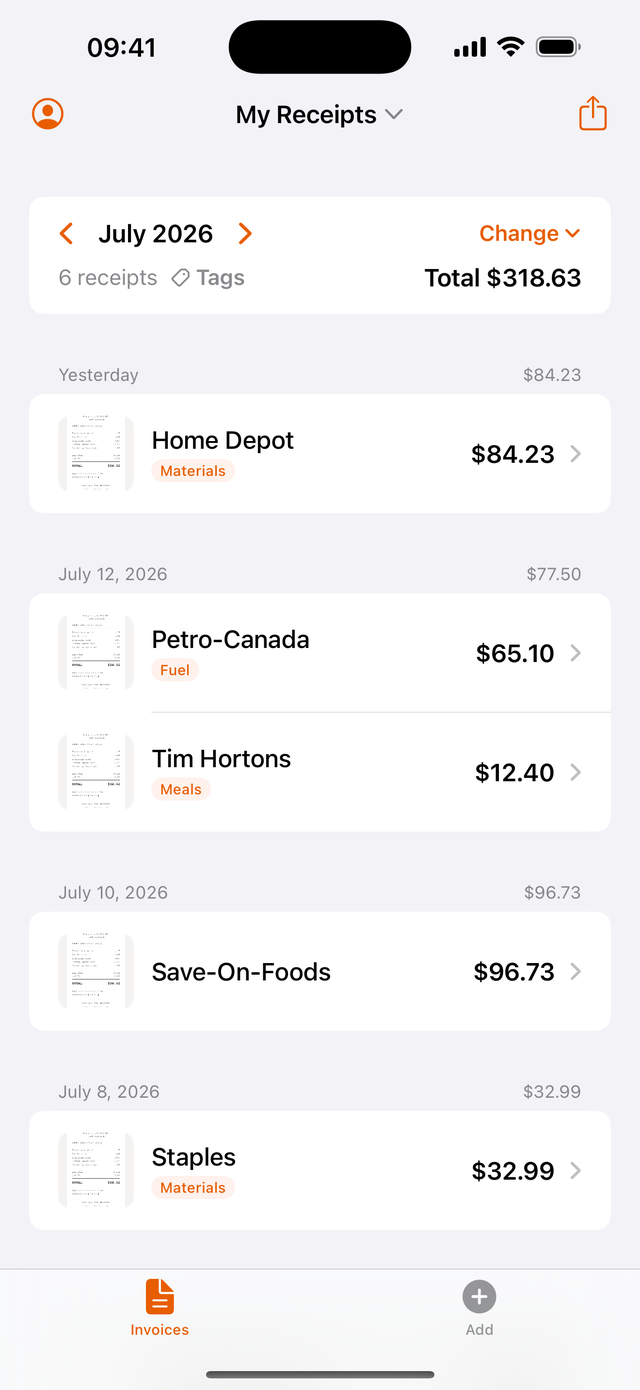
- Do not invent a new category per store. "Home Depot" is not a category; Materials is. "Petro-Canada" is not a category; Fuel is. The vendor name is already on the receipt. The label's only job is to say which T2125 line this feeds.
- Add job or client labels when you bill costs back. A second label like "Anderson kitchen" or "Client: Northshore" lets you pull every receipt for one job when it's invoice time. Job labels and tax labels coexist; they answer different questions.
- When in doubt, tag it anyway. An imperfect label beats no label. Park the genuinely unclear ones under a "Check" label and ask your preparer about the handful that accumulate.
What does month-end look like?
About ten minutes, once the labels exist:
- Filter by each label and skim. A gas receipt sitting under Meals jumps out immediately when it's one of six receipts on a screen instead of one of six hundred in a pile.
- Glance at the totals. Category totals per month are your early warning: a Meals total that doubled, a Fuel total with a missing week. Catching it in the same month means you still remember what happened.
- Hand over labelled data, not a pile. If a bookkeeper or accountant does your return, give them a CSV where every row already carries its category. They sort one column, sum each group, and drop the totals onto the T2125 lines. That's minutes of their time instead of hours of it, and hours are what you're billed for.
Come April, the return's expense section is already 90% done, and if the CRA ever asks about a line, the receipts behind it are one filter away. That is what audit-ready actually means.
Where Bagging fits
Bagging: Receipts & Expenses is a free iPhone receipt keeper built around exactly this flow. Snap a receipt and the vendor, total, and date are filled in for you; add a tag as you save, whether that's a category like Fuel or a job like "Anderson kitchen". Tags autocomplete, so "Materials" stays "Materials" instead of drifting into five spellings, and they're shared across your workspace, so everyone on the job labels receipts the same way. The list filters by tag, the CSV and PDF exports filter by tag, and the CSV includes a Tags column your bookkeeper can sort on directly. Your label set, applied at the counter, delivered as clean columns at year-end.
Common questions
How do I categorize receipts for taxes in Canada?
Use the expense lines from CRA Form T2125 as your category list: materials and supplies, meals (50% deductible), vehicle, office, insurance, rent, repairs, travel, advertising, bank charges, and professional fees. Label each receipt with one of those categories when you capture it, then total each category at tax time. You don't need software; you need the same short list applied consistently all year.
What expense categories does the CRA use?
The expenses section of Form T2125 lists them by line number: advertising (8521), meals and entertainment (8523), insurance (8690), interest and bank charges (8710), licences and memberships (8760), office expenses (8810), office stationery and supplies (8811), professional fees (8860), rent (8910), repairs and maintenance (8960), travel (9200), utilities (9220), motor vehicle expenses (9281), and other expenses (9270). Capital purchases go through capital cost allowance and a home workspace goes through the separate business-use-of-home calculation.
Do I need accounting software to track receipts?
No. A sole proprietor's expense reporting is a set of category totals on Form T2125, and you can produce those totals from any labelled list of receipts, including a receipt app that exports CSV. Accounting software earns its keep when you have inventory, payroll, or invoicing complexity. For keeping and categorizing receipts, a consistent label set applied at capture does the job.
Can I just give my accountant a shoebox of receipts?
You can, but you'll pay for it twice: once in their hourly rate to sort a year of paper, and again in whatever faded or missing receipts never make it into a deduction. Handing over receipts that already carry category labels, ideally as a CSV with a category column, turns their sorting job into a sum and usually lowers the bill.
What if a receipt fits more than one category?
Pick the category that matches where the amount will land on the T2125 and stay consistent. Some common splits have fixed answers: vehicle gas is always a vehicle expense, not fuel, and home utilities go in the business-use-of-home calculation, not utilities. Meals on a work trip can sit under meals or travel on the form; either way the 50% limit applies, so pick one label and keep it. For the rare genuinely ambiguous receipt, tag it with a holding label like Check and ask your preparer.
Tag it the moment you snap it
Bagging is a free iPhone app built around exactly this: snap a receipt, it reads the vendor, total, and date, and you add a tag (a category, a job, or a client name) right there. Tags autocomplete, your bookkeeper sees the same labels, and any date range exports to CSV or PDF filtered by tag, with a Tags column in the CSV.
This guide is general information, not tax advice. Expense rules have conditions this page does not cover. Your accountant knows your situation; sources are linked inline and were checked July 2026.