Receipt turned black? Why it happens and what to do
Short answer: heat did it. A thermal receipt develops its image with heat, so anything that warms the whole sheet later, most often a car in the sun, develops the entire coating at once. If the strip is uniformly dark you are holding a black receipt: the original text is gone and no home method brings it back. The expense is usually still claimable, but you rebuild the evidence rather than the paper.
What actually happened
A thermal receipt has no ink. It carries a colourless dye and an acidic developer in a surface coating, and the printer makes text by heating the spots where the characters should be. The United States Environmental Protection Agency describes direct thermal printing as producing an image by selectively heating specific areas of the paper (EPA, Bisphenol A Alternatives in Thermal Paper).
Selectively is the whole trick. Your receipt is readable only because some of the coating reacted and the rest did not. A dashboard in July, a radiator, a laminator, or an iron heats every part of the sheet equally, so the parts that were blank react too. The contrast that made the text visible is what you lose.
Receipt stock is especially exposed. The EPA notes that thermal paper used for receipts typically lacks the protective top and back coats that heavier thermal grades carry, and those coats are what shield against mechanical stress and chemical reactions.
What can turn a receipt black
Heat is the usual cause of a fully black strip, but it is not the only thing that darkens thermal paper. What the paper makers and archivists list:
| Cause | What it does |
|---|---|
| Heat: a car dashboard in the sun, a radiator, a laminator, an iron | Develops the whole sheet at once. Receipt paper starts forming colour from about 60 °C, depending on the paper (Jujo Thermal), and a dashboard in the sun averages about 69 °C after an hour (UC San Diego) |
| Friction or pressure: scratching, a fingernail, keys or coins | Grey or black marks where the paper was rubbed or pressed (Jujo Thermal, Ricoh) |
| Alcohol and solvents: hand sanitizer, acetone, solvent-based glue | Dark patches where the liquid touched the coating (Jujo Thermal) |
| High humidity | Can darken the coating or wash out the contrast (Mitsubishi Paper) |
| Age | The text can fade, or the whole surface can slowly darken (US National Archives) |
Sunlight, plastic sleeves, tape, hand lotion and sweat work the other way: they fade the print rather than blacken the paper. That is covered in why receipts fade.
Is it recoverable?
Be honest about which of two states you are in, because they have different answers.
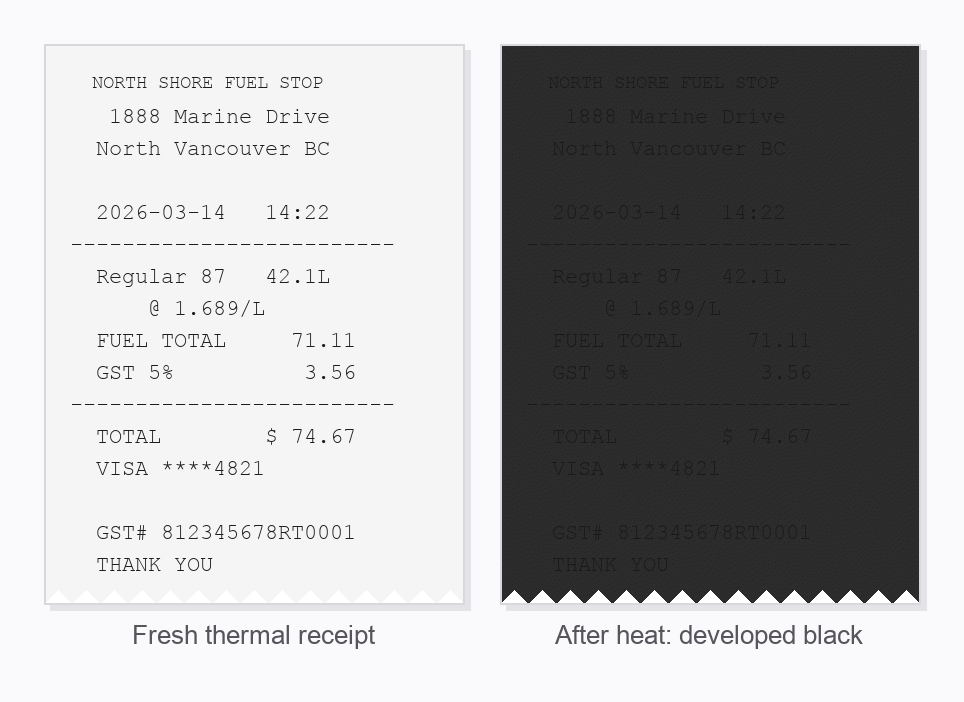
Uniformly dark or fully black: no. The coating has already reacted across the entire sheet. There is no residual difference between where the text was and where it was not, so there is nothing for any technique to amplify. Every method that claims otherwise is either working on the other case below, or is folklore.
Dark but with faint ghosting still visible: possibly. If you can make out traces of characters at an angle, some contrast survives, and the list below is worth working through.
What to try, in order
- Stop adding heat. Verdict: never helps. No hair dryer, no iron, and never a laminator. Heat caused the problem, and no source shows it reversing the colour: it darkens the background exactly as much as anything left of the text, and the reaction cannot be run backwards. A laminator is the worst of the three, because the heat that seals the pouch is the same heat that develops the coating.
- Photograph it now, as it is. Verdict: always. The paper will not get better, and a photo freezes whatever is left at no cost.
- Ask the merchant for a reprint. Verdict: the best outcome. The shop's point of sale system still holds your transaction, and a reprint is a better record than anything rescued from damaged paper. Call with the date, roughly what time, the store location, the last four digits of the card you used, and the approximate total. Common card terminals can look up a past sale and reprint it, though how far back a store can search varies, and a terminal copy may show only the payment, so ask for the itemized receipt if the till can produce one.
- Raking light, then push the contrast. Verdict: sometimes if the darkening is patchy, a long shot if it is even. Hold a lamp or your phone light almost level with the paper and shoot from an angle. In your phone's photo editor, drop the exposure and raise the contrast, then view the result inverted: on iPhone that is Settings, then Accessibility, then Display & Text Size, then Classic Invert. Full step by step here.
- UV light. Verdict: a long shot. In forensic studies, UV has pulled text back from faded receipts, but not from heat-blackened ones. If you try it, use an ordinary UVA blacklight, never a UVC sanitizing wand, which can injure skin and eyes within seconds (FDA).
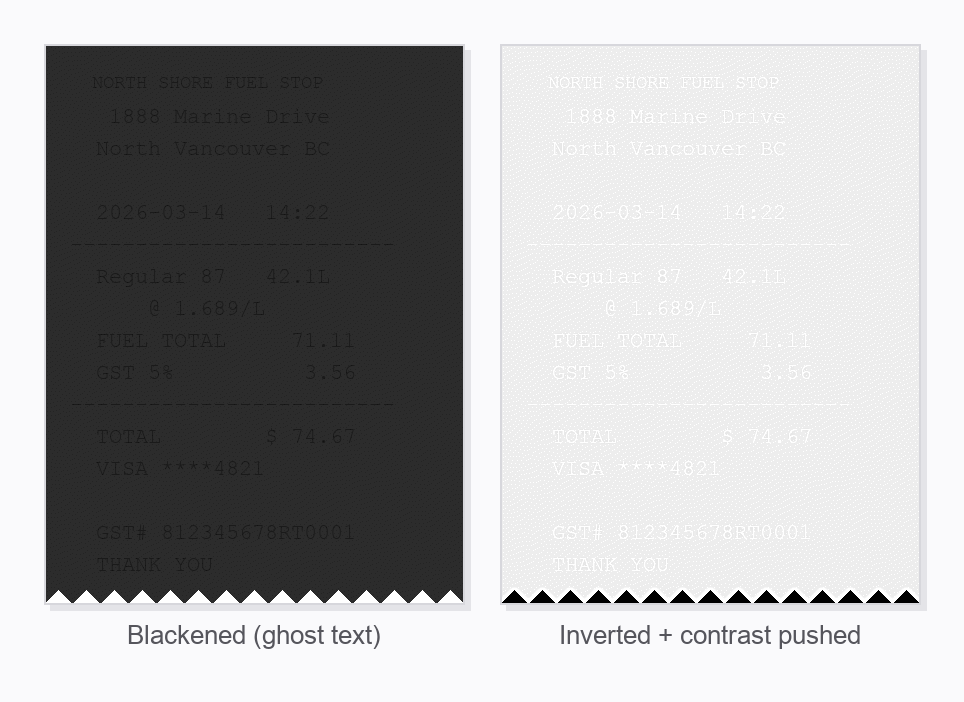
If the strip is uniformly black, steps 4 and 5 have nothing to work with. Go straight to the reprint, then rebuild the evidence as below.
Is the expense still claimable?
Usually yes. A blackened receipt is an evidence problem, not automatically a lost deduction, and it helps to know exactly which facts have to survive.
The CRA's business records guidance says an expense record should show the date of the purchase, the name and address of the seller or supplier, the name and address of the buyer, and the full description of the goods or services (CRA, Business records). Rebuild those from a merchant reprint, a card or bank statement line, and a note written while you still remember the purchase.
One caution if you are registered for GST/HST and claiming input tax credits. A statement alone will not carry it. GST/HST Memorandum 8.4 states that a monthly credit card statement does not constitute sufficient documentary evidence to claim an input tax credit, and must be supported by another document such as a credit card receipt or an invoice (CRA, Memorandum 8.4). For a purchase of $100 or more you also need the supplier's GST/HST registration number, which a statement will never show, so the merchant reprint becomes the practical route.
Check the rest of the batch
If one receipt went black in the car, the others that travelled with it took the same heat. Some will be visibly dark, others merely weakened and heading the same way. Go through the whole envelope now and photograph everything that is still readable, because this is the one moment when a few minutes of work saves the rest of the set. A free receipt scanner app turns a stack like that into a searchable record in one sitting. For the storage conditions that cause this and how to avoid a repeat, see why thermal receipts fade.
The takeaway
Black means the coating already reacted everywhere, and reacting it further cannot undo it. Skip the heat tricks, phone the merchant, and rebuild the record from a reprint plus a statement line plus a contemporaneous note. Then photograph the receipts you still have, because in Canada the records supporting a claim need to survive six years from the end of the tax year, and a summer in a car is a lot less than six years.
Common questions
Why did my receipt turn black?
Heat. A thermal receipt carries a colourless dye and an acidic developer in a coating, and a print head makes text by heating selected spots. Anything that heats the whole sheet later, a car dashboard in the sun, a radiator, a laminator, or an iron, develops the entire coating at once, so the whole strip darkens instead of just the printed characters.
What else can turn a receipt black besides heat?
Friction and pressure leave grey or black marks, alcohol and solvents such as hand sanitizer or acetone darken the coating where they touch, and high humidity or age can darken the whole surface. Sunlight, plastic sleeves, tape and hand lotion do the opposite: they fade the print rather than blacken the paper.
Can a receipt that turned black be recovered?
If it is uniformly black, no. The coating has already reacted across the whole sheet, so there is no contrast left for any technique to amplify. If it is dark but you can still see faint ghosting of the original text, it is worth photographing under angled light and pushing the contrast, because some signal may remain.
Can I still claim an expense if the receipt turned black?
Usually yes, if you can rebuild the evidence. The CRA asks a business expense record to show the date, the name and address of the seller, the name and address of the buyer, and a description of what was bought. A reprint from the merchant is the cleanest replacement, because their point of sale system still holds the transaction.
Is a credit card statement enough to replace a blackened receipt?
On its own, usually not. A statement shows a merchant name, a date and a total, and nothing else. For GST/HST input tax credits the CRA is explicit: GST/HST Memorandum 8.4 says a monthly credit card statement does not constitute sufficient documentary evidence, and must be supported by another document such as a credit card receipt or an invoice.
Will a hair dryer or an iron bring the text back?
No, and it is the fastest way to destroy what is left. Heat is what caused the problem. A print head works by heating chosen spots and leaving the rest cool, while a hair dryer or iron heats text and background equally, so any surviving contrast is flattened rather than restored. The change cannot be undone.
A photo does not care how hot the car gets
Bagging is a free iPhone app: photograph a receipt once, on-device text recognition reads the vendor, total and date, and the image stays filed and exportable long after the paper has given up.